Monday, August 31, 2009

CKEditor v3.0 - A Complete Rewrite of FCKeditor

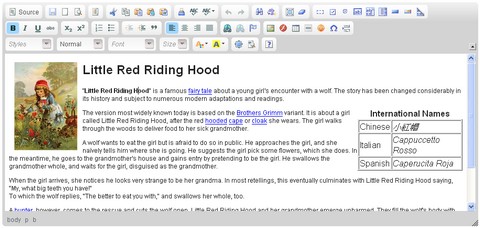
CKEditor is a Version 3.0 of FCKeditor. After almost two years of intensive development, the first stable version of CKEditor 3.0 has finally released.

CKEditor is a complete rewrite of our so loved FCKeditor, which got a bit old after six years of great success. Not to say that FCKeditor is doing bad, but there are some new things we could bring to it, and CKEditor is the result of it. There are dozens of new features in CKEditor.

CKEditor is fast to load and fast to use. The development team stayed focused to bring the best performance you can have, using all modern best practices. You’ll be amazed with it.

You’ll note that they have also a brand new UI based on the Kama skin. Other than modern, Kama is colorful like a chameleon, so you can precisely match its color to your needs. This is an innovative and unique feature you’ll find in CKEditor only.

The CKEditor code is also much different now. It’s up to date with the new JavaScript development requirements, offering a rich and powerful integration and interaction API. The editor is totally plugin based, and it can be extended and modified in all senses to fit all needs.
CKEditor

Requirements: Internet Explorer, Mozilla Firefox, Google Chrome, Safari and Opera
Demo: http://ckeditor.com/demo
License: GPL, LGPL, MIT License

http://ckeditor.com
http://www.webappers.com/2009/08/26/ckeditor-v30-a-complete-rewrite-of-fckeditor/

Snow Leopard Upgrade

Sunday, August 30, 2009

RVM: Ruby Version Manager

You want to try out all of the different ruby interpreters and versions including different patchlevels, but you don't want to break what's working for you now. No time to waste?

Use rvm. Easy installation and switching between available Ruby versions and runtimes, without messing up your current Ruby install! rvm also allows you to use multiple versions of ruby in separate terminals concurrently!

http://rvm.beginrescueend.com

Thursday, August 27, 2009

ieHTTPHeaders


ieHTTPHeaders is an Explorer Bar for Microsoft Internet Explorer that will display the HTTP Headers sent and received by Internet Explorer as you surf the web. It can be useful in debugging various web-development problems related to cookies, caching, redirection, proxy servers, etc. It is nicely integrated with Microsoft Internet Explorer so you'll be able to see the HTTP headers as they sent and received from the web server, without any need to fire up an extra tool set.
Using its built in filtering capabilities, you can filter away transaction based on their content type or the HTTP status code so you can focus on watching and debugging what you find interresting.
Some of the features include:
  • SSL support
  • Filtering based on content type
  • Filtering based on HTTP status code
  • Customizable coloring scheme for requests and responses
  • Cherry pick from seing the request, the reponse, the request body (POST data), or all at the same time.
  • Grouping of requests and responses for easier debugging
  • Use ieHTTPHeaders to debug or troubleshoot your web development, or use it for general spelunking. Ever wondered how a web server handles caching, redirections, e-tags, etc? Fire up ieHTTPHeaders and have a look!


http://www.blunck.se/iehttpheaders.html

Wednesday, August 26, 2009

Building a Video Portal in Rails

http://blog.envylabs.com/2009/08/building-a-video-portal-in-rails/

iso_countries

iso_countries - Store countries using ISO 3166 codes

This rails plugin enables you to store country info only with the country's ISO-3166 code
== Example

class Company < ActiveRecord::Base
iso_country :country
end

c = Company.new :country => "es"
c.country # => "es"
c.country_name # => "Spain"
c.country_name = "France"
c.country # => "fr"
ISO::Countries.set_language "es"
c.country_name # => "Francia"

<% form_for @company do |f| %>
<%= f.iso_country_select :country, [:es, :en] %>
<% end %>
Translations are provided by the iso-codes package
http://pkg-isocodes.alioth.debian.org/

http://github.com/etaque/iso_countries/tree/master

Hijack: Provides an irb session to an existing ruby process

Hijack allows you to connect to any ruby process and execute code as if it were a normal irb session. Hijack does not require your target process to require any hijacking code, hijack is able to connect to any ruby process. It achieves this by using gdb to inject a payload into the process which starts up a DRb server, hijack then detaches gdb and reconnects via DRb. Please note that gdb will halt your target process while it is attached, though the injection process is very quick and your process should only be halted for a few milliseconds.

Hijack uses DRb over a unix socket file, so you need to be on the same machine as the process you want to hijack. This is by design for security reasons. You also need to run the hijack client as the same user as the remote process.

http://github.com/ileitch/hijack/tree/master